 Silvo
Know whether your child's draft meets the marking guide, while there's still time to fix it.
Your child adds the teacher's marking guide and their draft. In about two minutes Silvo shows where the draft sits against each criterion, quotes the sentences that need work, and lists what to do next. It never writes a word of it for them.
For Years 3 to 12, any written assignment. One price for the family.
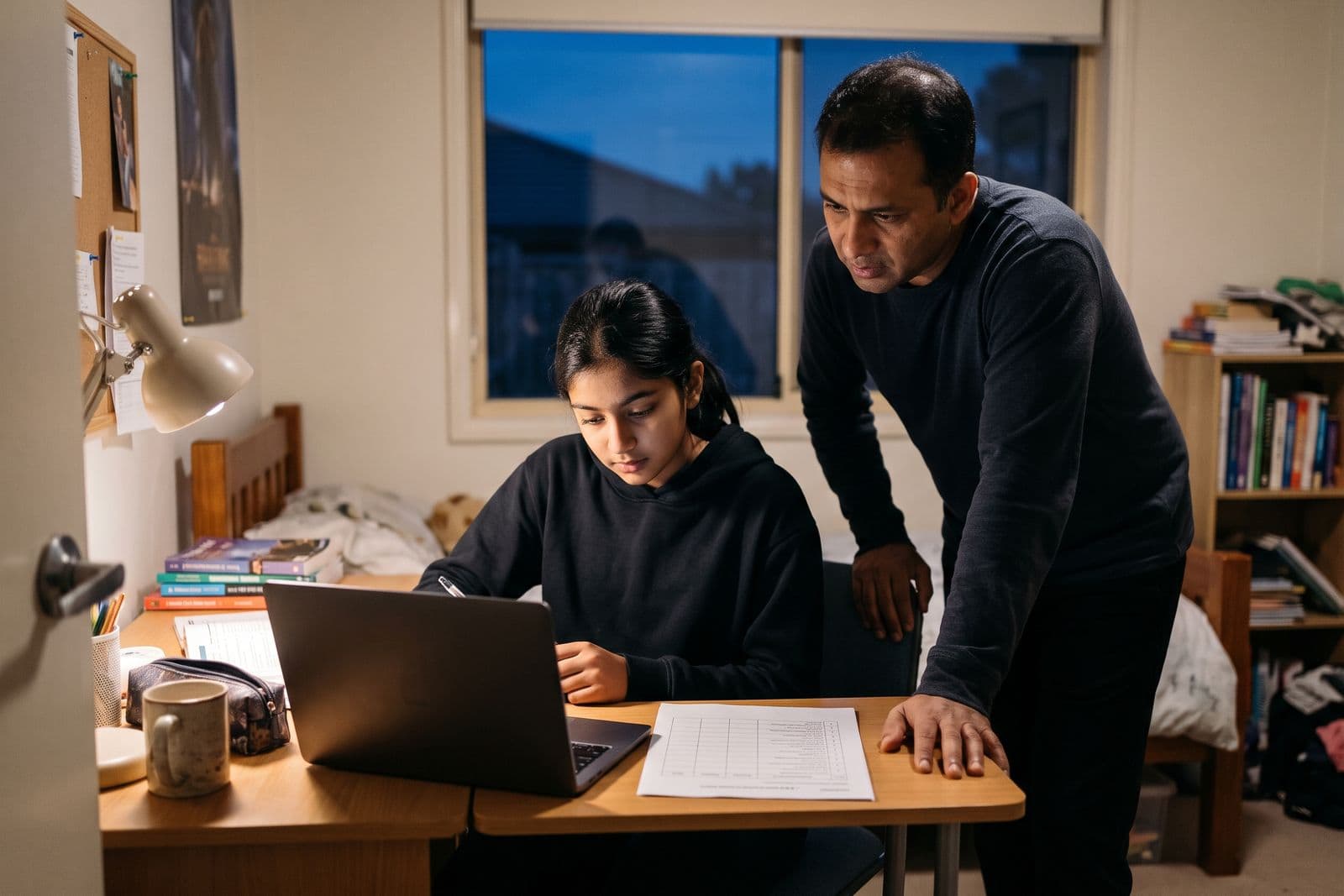
The night before it's due, can you tell if it meets the marking guide?
Most feedback arrives after the work is marked, when it is too late to use.
Senior marking guides are written for teachers. A Year 11 English guide asks for writing that “analyses how language choices shape the representation, with relevant evidence”. Few parents can say whether a draft does that.
General AI chat tends to praise a draft or rewrite it. Neither helps your child learn to fix it.
What Silvo does with a draft
The marking guide
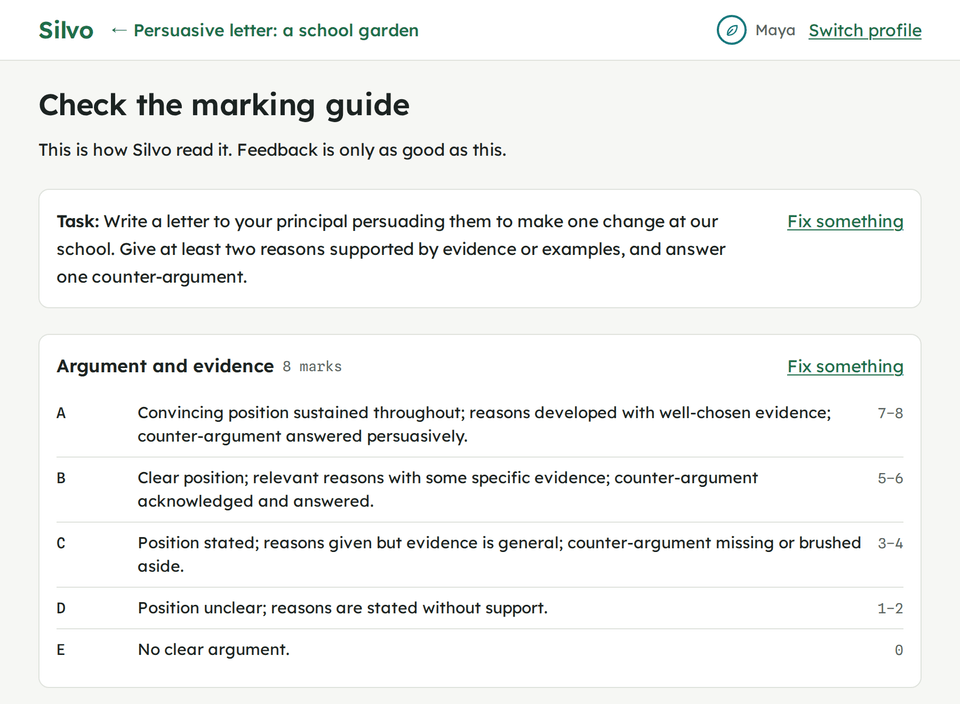
It reads the teacher's marking guide first, and shows your child what it read.
Photograph the rubric or task sheet, upload the file, or paste it. Silvo lays out each criterion with its levels and marks, and your child checks it before any feedback is written. If Silvo read something wrong, they fix it there.
The evidence
Every comment quotes your child's own words.
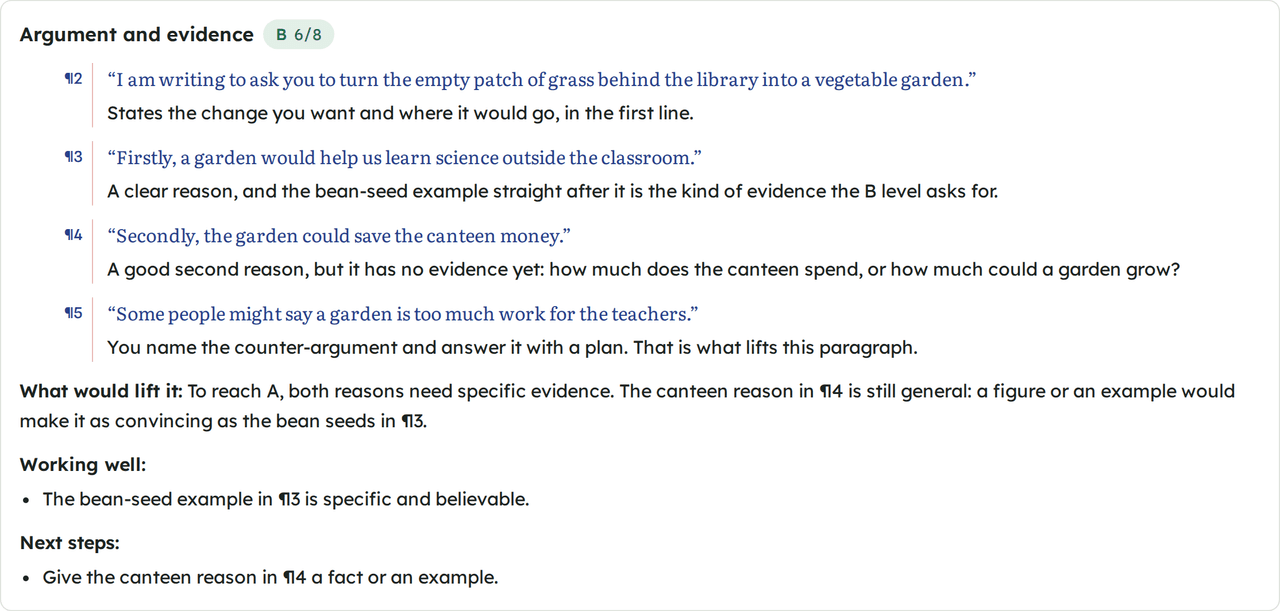
For each criterion Silvo gives the level the draft is at, the sentences that show it with their paragraph number, and what would lift it to the next level. Every quote is checked against the draft in code, so Silvo can't point at a sentence your child didn't write.
The line Silvo doesn't cross
It points to the problem. It never writes the fix.
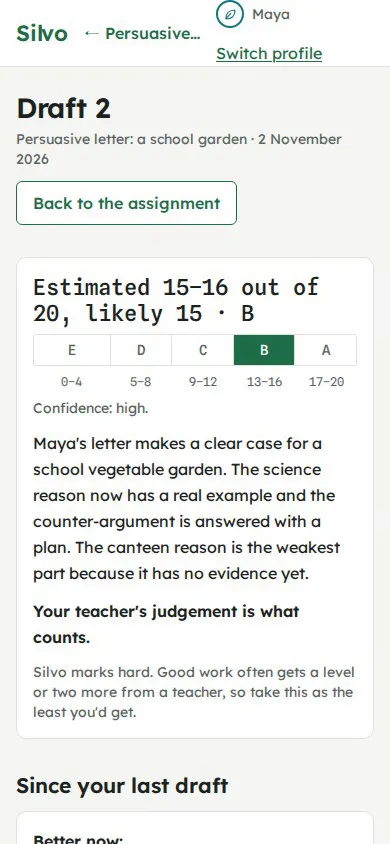
This is a real comment from Maya's feedback. It names what's missing and asks the question that leads to it. The sentence she writes next is hers.
“Secondly, the garden could save the canteen money.”
A good second reason, but it has no evidence yet: how much does the canteen spend, or how much could a garden grow?
Silvo is built not to rewrite a sentence, write a paragraph, supply an answer or write an example on your child's topic. A separate check reads every piece of feedback for these before your child sees it.
The next draft
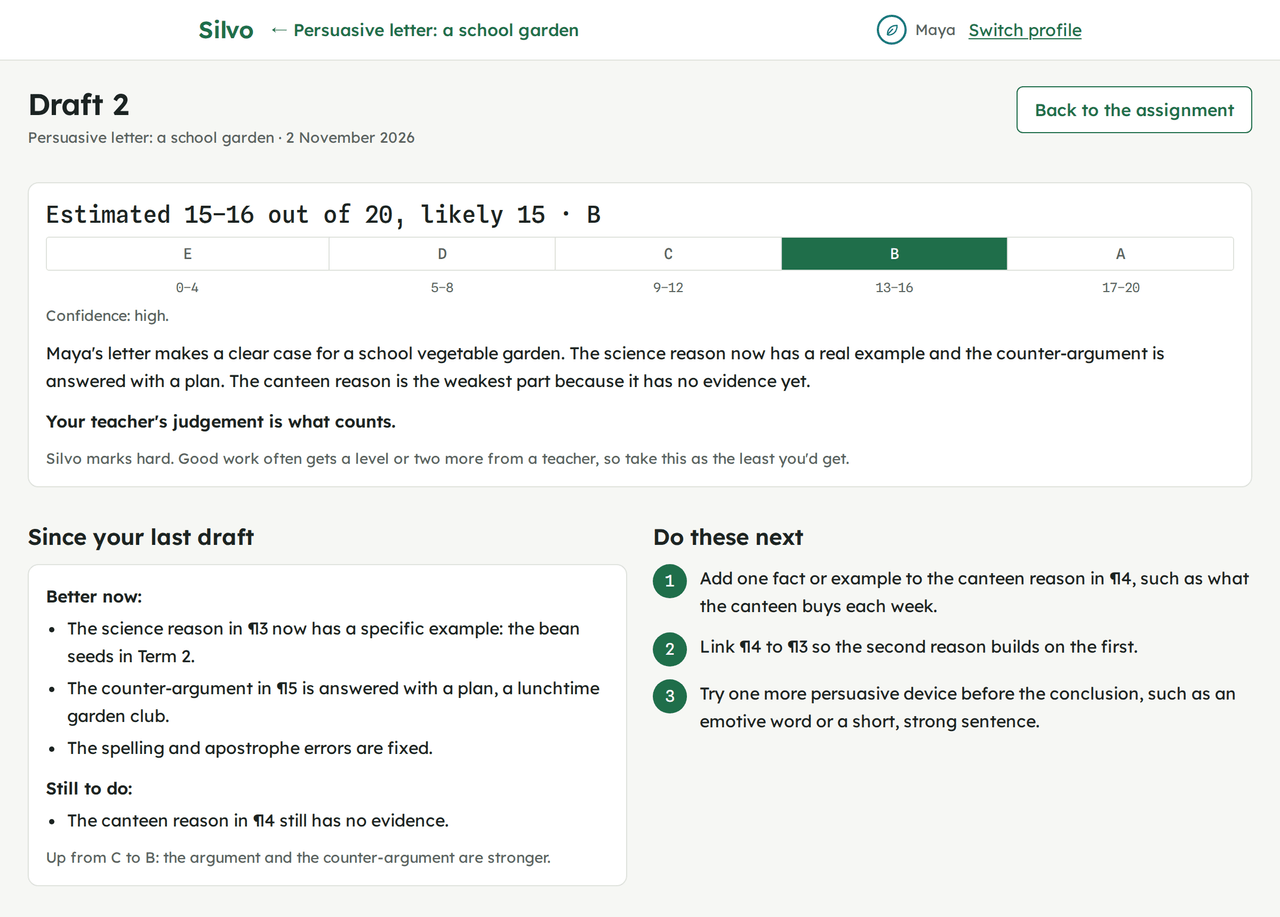
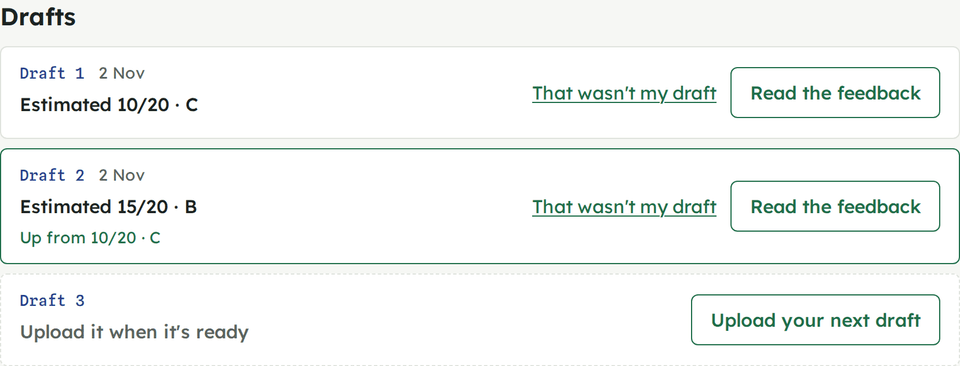
Five drafts per assignment, and each one says what changed.
Every new feedback starts with what improved since the last draft and what is still open, and the assignment page lists each draft with its estimate. Your child sees the work get better, not just a new list of problems.
These rules follow accepted principles from research on feedback.Built on how good feedback works
How it works, start to finish
Add the marking guide
Photos, a file or pasted text, once per assignment. If a brother or sister adds the same guide, it's already checked.
Check what Silvo read
The criteria and levels, and for a handwritten draft the words Silvo read from each photo, with any it wasn't sure of marked.
Send the draft
Typed or pasted, a Word, PDF or slides file, or photos of up to 8 handwritten pages.
Read the feedback, fix the top things
It usually takes about two minutes. Then the next draft, when it's ready.
What you see as a parent
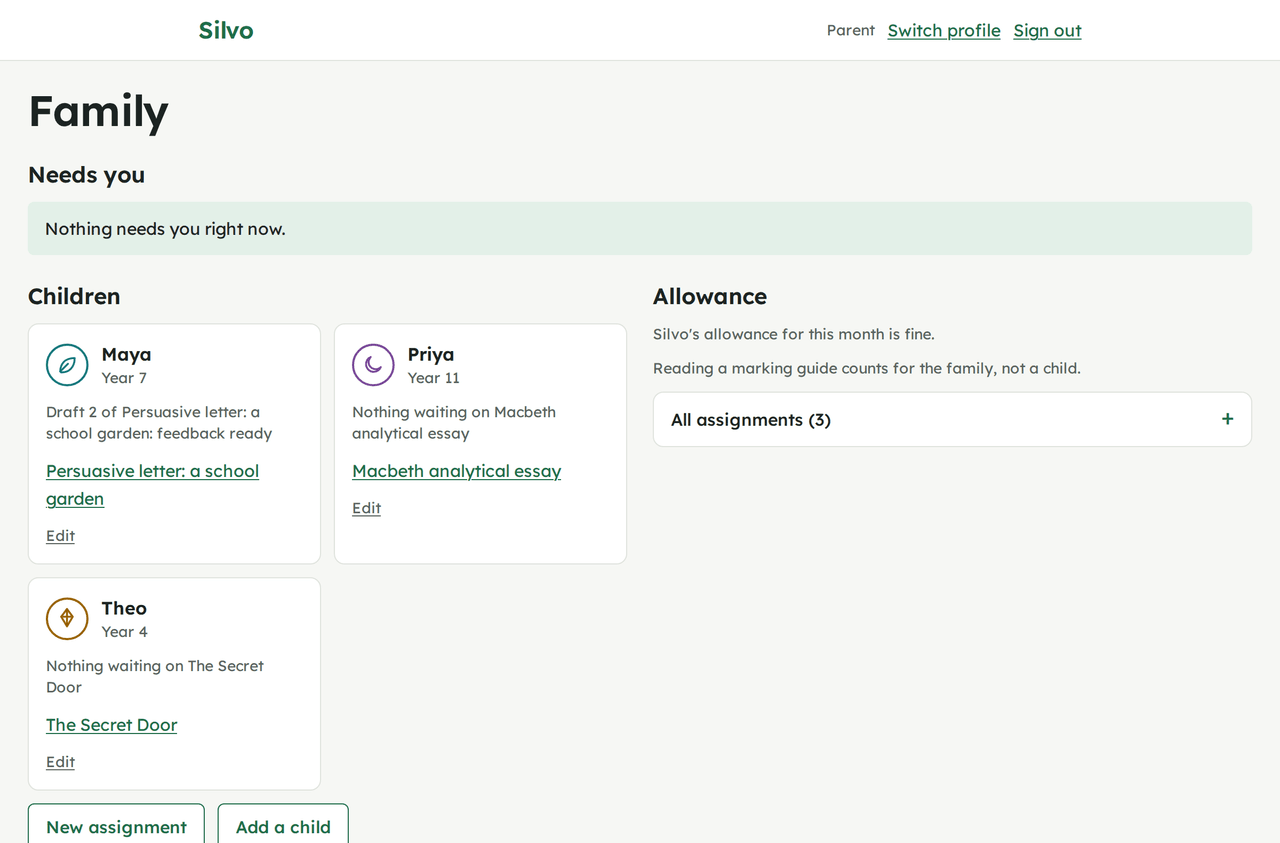
Your Family page shows what needs you first: a draft that didn't work, an assignment waiting for the teacher's mark, feedback your child said wasn't helpful. Then each child at a glance.
You can open any assignment and see exactly what your child sees, with your own controls at the foot: allow another draft, mark it handed in, delete a draft.
If your child's writing suggests they may not be safe, the first thing on the page is “Please check in with” your child.
What happens to your child's work
- What Silvo asks for
- A first name, year level and age. Never a surname, school or date of birth. Your child has no account or email address.
- What goes to the AI model
- The marking guide and the draft, with your children's first names hidden (you can turn this off; photographed pages are read before names are hidden). Nothing your family uploads is used to train a model.
- How long it's kept
- Uploaded files and photos are deleted after 90 days. Feedback stays until you delete your family, or until 90 days after your trial or subscription ends.
- What you can do
- Take a copy of everything, or delete your family and everything in it, at any time.
One price for the family
Every child up to 5, every assignment under fair use. No charge per feedback, and your child never sees a cost.
Family
The one planA$199 a year, for the whole family
Or A$24 a month. Yearly saves A$89. GST included.
- Every child in the family, up to 5, Years 3 to 12
- Every assignment they need, under fair use
- Five drafts with feedback per assignment; you can allow more
- Typed, uploaded and photographed handwritten drafts
- The Family page and safeguarding alerts
- No charge per feedback, and no cost shown to your child
Free trial: your first 2 assignments, no card and no time limit
Questions parents ask
How much of my time does it take?
You set the family up once: your account, then each child's first name, year level and age, and you sign in on the devices they use. Children have no password of their own; they pick their name.
From Year 7 most children can use Silvo on their own. Younger children often do it with you beside them, and from your own profile you can do anything they can.
What does it cost, and is anything charged on top?
One price for the family: A$199 a year, or A$24 a month (yearly saves A$89), GST included. Nothing is charged per feedback or on top, and your child never sees a cost.
Every child in the family, up to 5, and every assignment they need, under fair use: the plan is for your own family's schoolwork.
Is this more screen time?
A little. Your child adds the marking guide once, sends each draft when it's ready, and reads the feedback. The writing happens wherever they write now: in Word, in Google Docs or on paper.
Silvo has no games, points, streaks or notifications.
Is my child's work safe?
Silvo asks for a first name, year level and age, and never a surname, school or date of birth. Your child has no account and no email address of their own.
Your family's account and everything in it is stored in Malaysia today, on servers rented from Hostinger, and moves to Australia before Silvo opens to every family. To write feedback, Silvo sends the marking guide and the draft to an AI model (Claude, made by Anthropic, in the United States). It hides your children's first names first, unless you turn that off; photographed pages are read as pictures first, and names are hidden after that reading. Nothing your family uploads is used to train a model. Uploaded files and photos are deleted after 90 days, and you can delete your family and everything in it whenever you like.
Isn't this AI doing their homework?
No. Silvo never writes, rewrites or "improves" your child's work, and never gives answers. It quotes what they wrote, says what the marking guide asks for, and says what to try next. A separate check reads every piece of feedback for rewritten sentences or answers before your child sees it.
Each assignment allows five drafts with feedback, so it stays about learning, not chasing a mark. If the school asks students to declare AI use, the feedback can be printed with a line that says so.
How do I cancel?
During the free trial there's nothing to cancel: Silvo takes no payment details for it. If you subscribe afterwards: cancel online any time, in two clicks. A yearly subscription runs to the end of the year you've paid for and a monthly one to the end of the month, and you aren't charged again. After that, feedback stops, but you can still sign in and take a copy of everything for 90 days, when your family and everything in it is deleted. Silvo emails you before that happens, and before each yearly renewal. On the monthly plan you can pause for up to 8 weeks, free, instead of cancelling.
You can also take a copy of everything and delete your family, with everything in it, from Family settings. Deleting asks for your password.
Will the estimate match my child's teacher?
It's an estimate, shown as a range on the marking guide's own scale (A to E, marks out of 20, 1 to 7), with how sure Silvo is and why. Silvo marks on the hard side: good work often gets a level or two more from the teacher. The feedback says so, and says that the teacher's judgement is what counts.
Try it on the next assignment that comes home.
All your child needs is the marking guide and a draft.